

Overview
How projects work in IronSled — the project lifecycle, the Project Scorecard and its KPIs, and the sections of a project (Team, Repositories, Containers, Environments, Tickets, Reports & Artifacts, and Settings).
Projects are the central organizational unit in IronSled. A project represents an application or service that a team is building, deploying, and operating on the platform. Everything in IronSled — team members, repositories, containers, environments, security findings, and tickets — connects through a project.
Project Lifecycle
Every project follows a defined lifecycle from creation through active development to eventual retirement:
- Onboarding — The project is being set up. Teams define their project details, team members, and requirements. AI-assisted onboarding helps generate configurations through natural language conversation.
- Submitted — The project configuration has been submitted for review by the platform team.
- Reviewing — The platform team is reviewing the project request for completeness and compliance.
- Implementing — The platform team is provisioning infrastructure, repositories, and environments.
- Available — The project is fully provisioned and active. All features — repositories, environments, and security scanning — are available.
- Decommissioned — The project has been retired. Resources are scheduled for cleanup.
Projects can also be Rejected during the review process if requirements cannot be met or if the request needs revision.
Project Scorecard
The project Overview page — titled Project Scorecard — provides an at-a-glance view of project health.
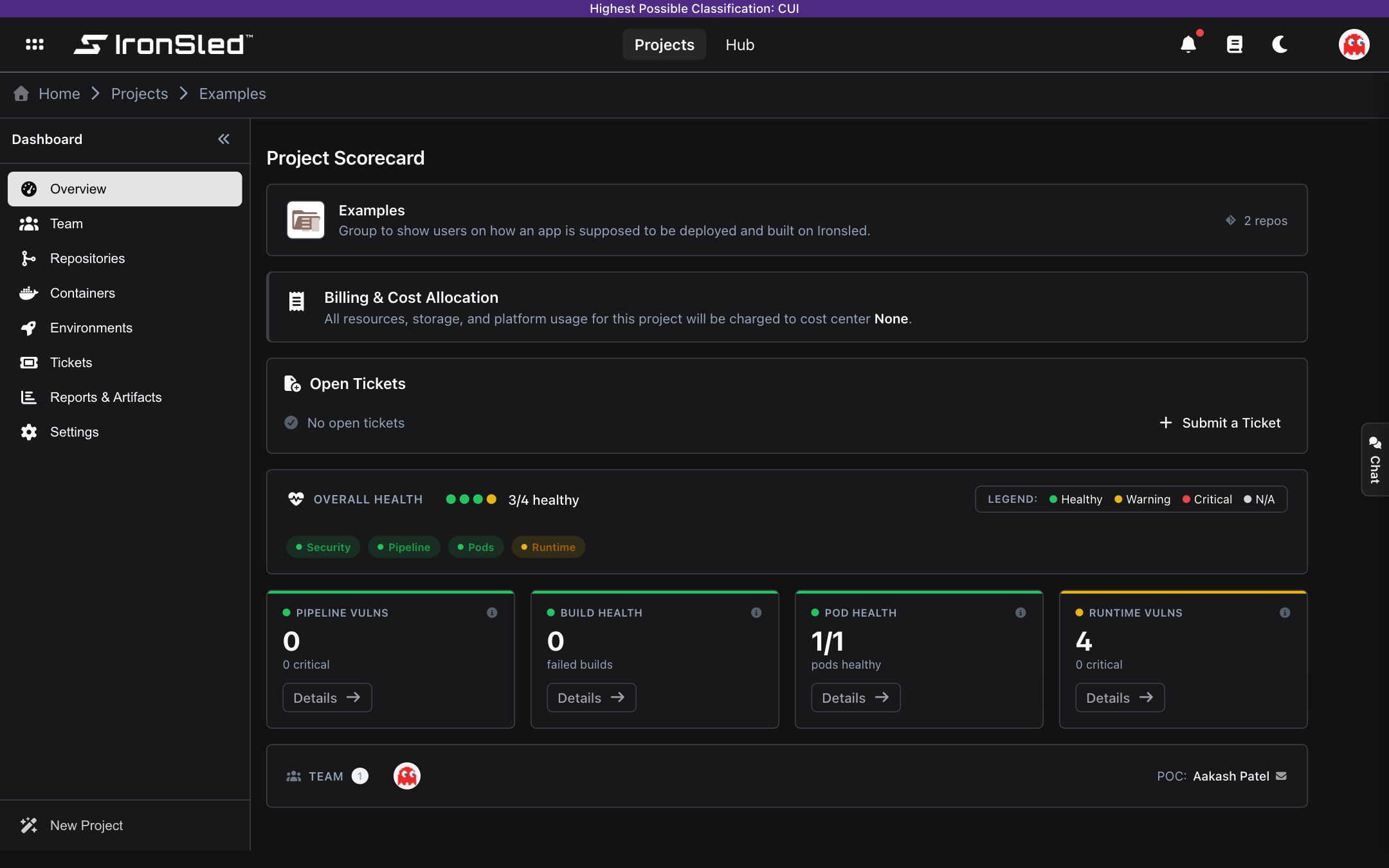
It surfaces project health through four key performance indicators:
- Pipeline Vulnerabilities — Total vulnerability count from Trivy scans on default branches across all associated repositories, with a breakdown of critical findings.
- Build Health — Number of failed pipeline builds, indicating CI/CD stability.
- Pod Health — Ratio of healthy pods to total pods across all environments (e.g., 8/10 pods healthy).
- Runtime Vulnerabilities — Security issues detected in running containers via the Trivy operator, with critical count highlighted.
These metrics feed into an overall health score displayed as a color-coded status for each category — Security, Pipeline, Pods, and Runtime (Healthy, Warning, Critical, or N/A). The scorecard also shows the project logo, description, point of contact, member count, repository count, and a preview of team member avatars, along with a Billing & Cost Allocation card (the cost center the project's resources, storage, and platform usage are charged to) and an open-tickets summary with a shortcut to submit one.
Sections of a Project
Once a project reaches Available, its sidebar (titled Dashboard) opens into the sections below. Each has its own page in this guide:
| Section | What you do there |
|---|---|
| Overview | The Project Scorecard described above — health score, KPIs, open tickets, team, and cost center. |
| Team | Add and remove members, assign roles (Owners, Maintainers, Developers, Reporters, Guests), and set a Point of Contact. Roles sync to your identity provider (Okta/Entra) and GitLab. |
| Repositories | Your GitLab repositories with branches, pipelines, merge requests, Trivy scan results, SBOMs, and release tags — all pulled from GitLab. |
| Containers | Container images and their versions with scan status — auto-discovered from CI pipelines (code projects) or uploaded (upload projects), on a one repository = one container model. |
| Environments | Kubernetes deployment targets linked from Rancher — workloads, pods, ingress, and runtime (Trivy Operator) security, with deep links into Rancher. |
| Tickets | Submit and track requests to the platform team (environments, databases, storage, networking, and general support), with AI-assisted parsing. |
| Reports & Artifacts | Generate velocity, runtime- and pipeline-vulnerability, SBOM, authorization-boundary, and component-inventory reports, with PDF/CSV/JSON export. |
| Settings | Project name, cost center, description, light/dark logos, and the danger zone (decommission and delete). |
Projects still in the onboarding phase show a simplified sidebar (titled Onboarding) with only Onboarding, Team, and Settings until the project reaches Available.
There is no separate "Compliance" section. Compliance artifacts for accreditation (ATO) — the Authorization Boundary diagram and the Component Inventory & SBOM — are generated and saved from within Reports & Artifacts.
Project Types
Both Code / Build and Upload projects use the same set of sections. They differ in content rather than structure: an upload project's Repositories section holds container-upload repositories (each surfaces as a container), and its Containers section is where images are uploaded rather than built by a pipeline. See Create a Project for how each project type is created.
Service Delivery
Initial tenant support framework defining IronSled support hours, request and incident response targets, tenant responsibilities, platform ownership boundaries, maintenance communications, and escalation paths.
Create a Project
How to create and onboard a project onto IronSled — the AI-assisted flow for Code/Build projects, the simple form for Upload projects, platform review, automated provisioning, and activation.