

Hub Overview
The IronSled Hub — a curated library of secure, team-maintained container base images, browsable in the portal and built on Chainguard Wolfi with near-zero known vulnerabilities.
The IronSled Hub is a curated library of secure, production-ready container base images maintained by the IronSled platform team. These images give development teams a trusted foundation for building their applications — pre-hardened, continuously updated, and free of known vulnerabilities. The Hub is a top-level area of the portal, browsable alongside Projects.
For the full list of available images, see the Image Catalog.
Why Use Hub Images
Container security starts with the base image. Public images from Docker Hub and other registries frequently contain hundreds of known vulnerabilities, unnecessary packages, and tools that expand the attack surface. Teams that build on these images inherit those risks before writing a single line of application code.
Hub images take a different approach:
- Built on Chainguard Wolfi — Most Hub images are built from the Chainguard Wolfi base using Wolfi packages, a Linux distribution designed specifically for containers. Wolfi packages are built from source with security patches applied upstream, resulting in images with near-zero known vulnerabilities.
- Rebuilt nightly — Every image in the Hub is rebuilt automatically every night, so the latest security patches are incorporated within 24 hours of availability — with no action required from development teams.
- Minimal attack surface — Images follow a distroless philosophy. Only the packages required for the runtime are included; tools like curl, wget, tar, shells, and text editors are removed.
- Non-root execution — All images enforce non-root user execution by default, following CIS Docker Benchmark recommendations.
- CIS compliant — Images align with Center for Internet Security Docker Benchmark standards.
By starting with a Hub image, teams begin every build with a clean, secure, and compliant foundation — built on the Chainguard Wolfi base and held to a zero-vulnerability standard.
Accessing Hub Images
Hub images are hosted on the IronSled container registry at registry.ironsled.com and are available to all projects on the platform. Teams reference Hub images in their Dockerfiles using the registry URL and the desired tag.
The images are built and maintained by the IronSled platform team — the source for every image in the Hub.
Each image maintains multiple tags representing different versions or build variants. Tags are updated nightly as images are rebuilt, so pulling the latest tag always retrieves the most recently patched version.
Browsing the Hub
The portal provides a browsable interface to the Hub under the Hub section in the main navigation. The Hub view displays all available images as cards showing:
- Image name with an official IronSled badge indicating it is a platform-maintained image.
- Description summarizing what the image provides.
- Category tag (node, python, database, auth, monitor, build-tools, utilities, web-server).
- Tag count showing how many versions are available.
- Last updated date indicating when the image was last rebuilt.
Teams can search images by name, filter by category, and sort by recently updated or alphabetically.
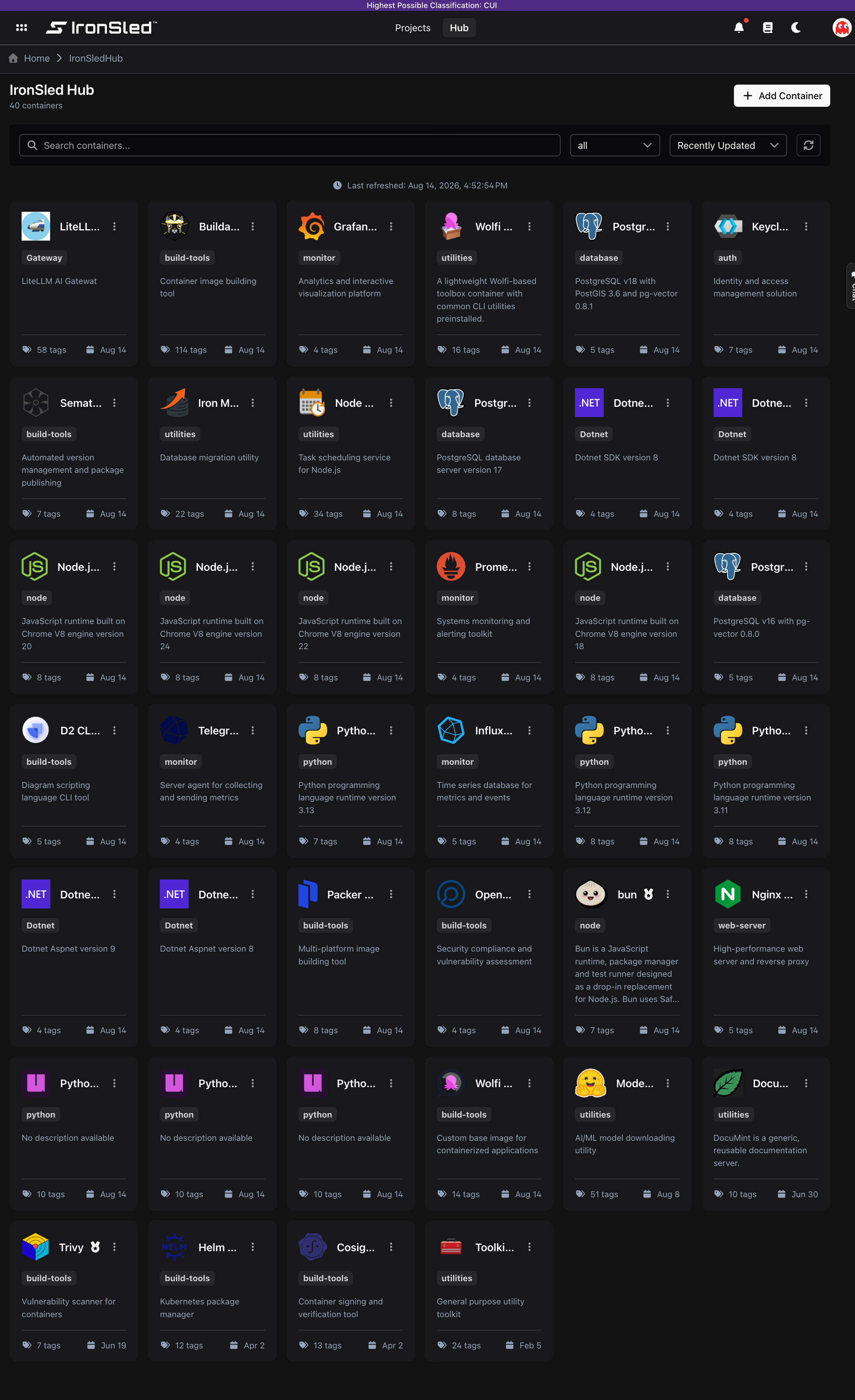
Image Detail View
Clicking an image opens the detail view, which provides:
- Overview — Full description, category, and the registry URL for pulling the image.
- Tags — A list of all available tags, each with the full
docker pullcommand (with a copy-to-clipboard button), last-updated and last-downloaded dates, and platform support (OS, architecture, compressed size, and digest per architecture).
This makes it easy to find the exact image and tag you need and copy the pull command directly into your Dockerfile or deployment configuration.
Requesting New Images
Teams that need a base image not currently in the Hub can request one through the IronSled platform team. A request can be submitted as a ticket within a project or by contacting the platform team directly. The team evaluates requests based on demand, security feasibility, and alignment with platform standards, and adds new images to the Hub as they are approved and built.
How Hub Images Stay Secure
The nightly rebuild process is the key to maintaining security across the Hub:
- Automated builds trigger every night for every image in the catalog.
- Wolfi packages are pulled from upstream with the latest security patches applied.
- Rebuilt images are pushed to the registry, replacing the previous nightly build.
- Vulnerability scans run automatically as part of the build pipeline, verifying that each image meets the zero-vulnerability target.
- Image signing with Cosign ensures the integrity and provenance of every image in the registry.
Teams that reference the latest tag in their CI/CD pipelines automatically pick up security updates on every build without any manual intervention.
Debug Pods and Common Failures
Troubleshoot Kubernetes pods on IronSled — read pod status and common states (Pending, ImagePullBackOff, CrashLoopBackOff), fix each failure mode, view and stream logs with kubectl logs (--previous, --tail, --since), exec into containers, use ephemeral kubectl debug containers, inspect events and describe output, check resource usage with kubectl top, verify ConfigMaps/Secrets/volumes, and follow a debug checklist.
Image Catalog
The full catalog of secure base images available in the IronSled Hub — runtimes, databases, authentication, web servers, monitoring, build tools, and utilities.